Email & Notifications
Every email ProNova52 sends — invites, reminders, welcome messages, internal admin notices — passes through a transparent mail queue. You see what was sent, when, to whom, whether it delivered, and how many retries it took.
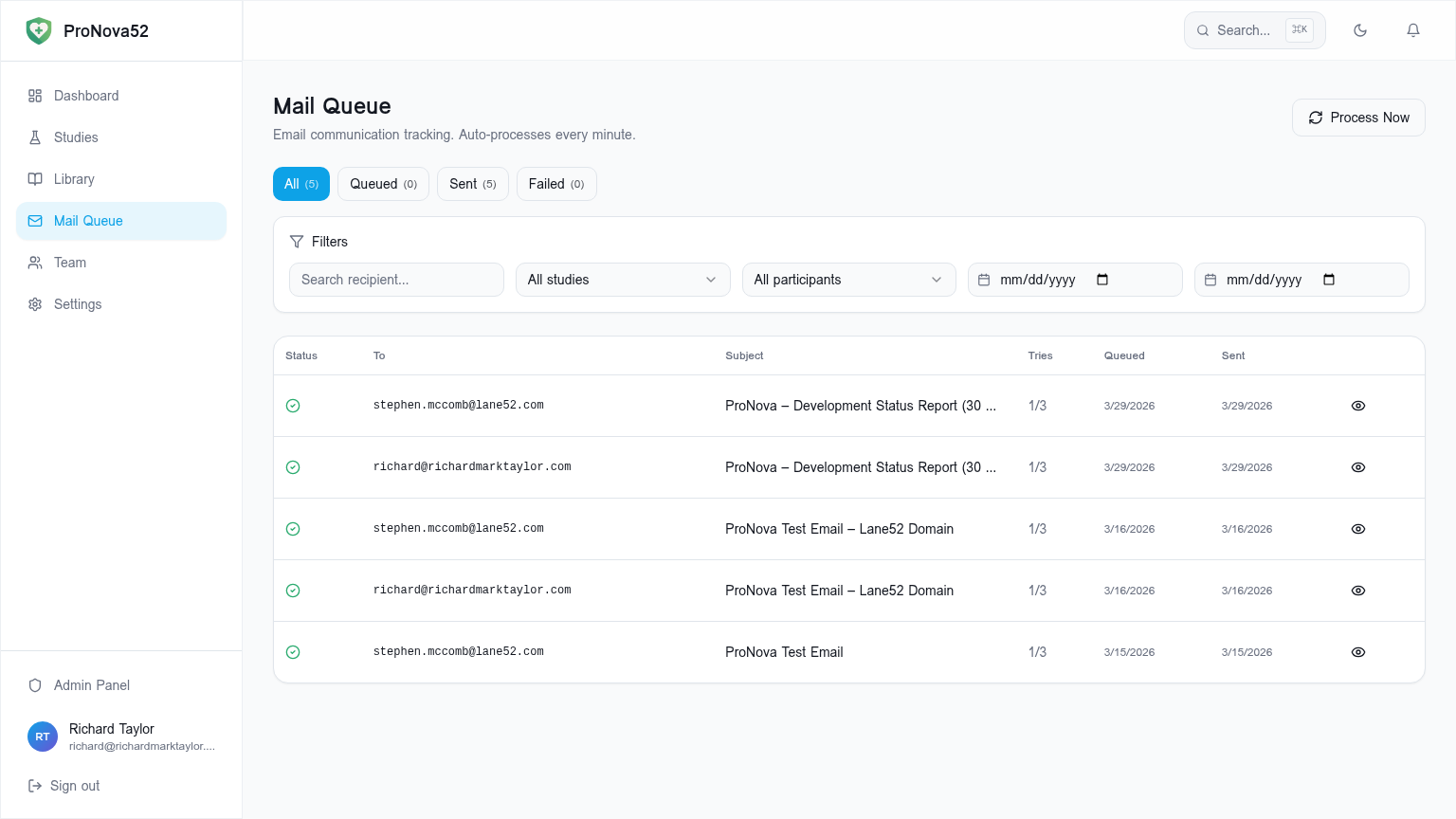
A queue you can actually see
The Mail Queue tab lists every message: status (queued, sent, failed), recipient, subject, attempt count, queue time, and delivery time. Failed messages can be requeued individually or in bulk by an administrator.
Branded, mobile-first templates
Templates inherit your organisation's colours and study banner imagery. Plain-text fallback is generated automatically for clients that strip HTML, and every email passes through SPF/DKIM-aligned sending infrastructure.
Retry and backoff that respects deliverability
Failed messages retry with exponential backoff up to a configurable maximum. Bounce and complaint signals from the email provider feed back into the participant record so you stop hammering invalid addresses.
Capabilities
- Per-message queue visibility (status, tries, queue time, sent time)
- Bulk requeue for failed messages
- Branded HTML templates with plain-text fallback
- SPF/DKIM-aligned sending via Resend
- Bounce and complaint feedback to participant record
- Per-study sender address override
Typical use cases
- Investigator-branded participant invites
- Deliverability audit for a sponsor query
- Bulk re-send after a provider outage